# Automating Weekly Ad Reports With an MCP-Connected Assistant

> An MCP-connected assistant writes the weekly report from live account data in ninety seconds. The bigger win is that you can ask it follow-ups.
- **Author**: Marxx
- **Published**: 2026-09-28
- **Category**: Product
- **URL**: https://marxx.ai/posts/automate-weekly-ad-reports-mcp

---

Friday afternoon, someone on the team exports four CSVs, pastes them into a deck, writes "spend was up 12% week on week" under a chart, and sends it. It takes three hours. Nobody replies.

An MCP-connected assistant can do the export-and-summarise part in about ninety seconds. That's the smaller half of the win. The bigger half is that once the data is in the conversation, the report can be *asked questions* -- and a report that answers questions turns into decisions, which is the only reason to write one.

Here's how to set it up, what to ask, and where it stops.

## What "automated report" should actually mean

| The old automation | What's worth building |
|---|---|
| Scheduled PDF of the same six charts | A written read of what changed and why |
| Account totals | Creative-level performance, named |
| "Spend up 12%" | "Ad C is carrying 38% of spend and fading -- replace it Monday" |
| One direction: data out | A conversation: ask the follow-up in the same thread |
| Sent to a folder | Posted where the team already is |

The test for any reporting workflow is the same as for an agency's weekly: **count the decisions in it.** Zero decisions means you automated the wrong thing faster.

## Setting it up

The Marxx MCP server puts your Meta and Google Ads accounts inside Claude or ChatGPT. It works with any client that supports remote MCP servers -- Claude, ChatGPT, Cursor, VS Code.

1. **Connect your ad accounts** to your Marxx workspace.
2. **Add the server** as a custom connector: `https://api.marxx.ai/mcp`
3. **Approve the OAuth connection** in Marxx.
4. **Select the workspace** you want the assistant to read.
5. **Ask in plain language.** No query syntax, no field names.

One thing to know before you hand it to a team: **it's read-only.** It cannot pause a campaign, move a budget or edit an ad. Twenty tools, all of them reads. Publishing happens in the Marxx app, behind approvals. That's what makes it safe to give a junior or a client.

## The prompt that writes the report

Don't ask for "a report". Ask for the shape you want:

<div style="background:#0f1115;color:#e6e8ec;border-radius:12px;padding:16px 20px;font-family:ui-monospace,Menlo,monospace;font-size:13px;line-height:1.65;margin:10px 0">
<span style="color:#6b727c">You</span>

Write this week's paid social report for <span style="color:#4dd4a6">[client]</span>.


Structure it as:

1. What changed, in one line

2. Creative-level read -- winners, faders, and the diagnosis for each

3. What competitors shipped that matters

4. Three decisions for next week, each with the number behind it


No account totals without a creative behind them. If something declined, name the failure mode rather than saying "CPA is up".
</div>

That last sentence is the one that changes the output. Without it you get description; with it you get "offer fatigue on the top spender" and a different next step.

## What comes back

<div style="background:#fff;border:1px solid #e3e6ea;border-radius:12px;padding:16px 18px;font-family:-apple-system,Helvetica,Arial,sans-serif;line-height:1.5;color:#2b2f36;margin:10px 0">
<div style="font-weight:700;margin-bottom:4px">Week 39 -- paid social</div>
<div style="color:#8a9099;font-size:13px;margin-bottom:12px">Spend flat. Two creative decisions, one competitor response, one tracking check.</div>
<div style="display:flex;gap:10px;flex-wrap:wrap">
<div style="flex:1 1 210px;border-left:3px solid #2f9e6e;padding-left:10px">
<b>The proof ad is now the account's engine</b>

<span style="color:#6b727c">Live 88 days, still the lowest cost per result of anything running.</span>

<b style="color:#2f9e6e">Decision:</b> two more concepts off the same promise, briefed Monday.
</div>
<div style="flex:1 1 210px;border-left:3px solid #d9534f;padding-left:10px">
<b>The welcome-offer static is fading</b>

<span style="color:#6b727c">Day 19, CTR down three weeks, 31% of spend. Diagnosis: offer fatigue.</span>

<b style="color:#d9534f">Decision:</b> change the offer's job, not the image. Off Tuesday if flat.
</div>
<div style="flex:1 1 210px;border-left:3px solid #e0a020;padding-left:10px">
<b>A competitor moved into hiring ads</b>

<span style="color:#6b727c">Three recruitment creatives, 32 days each, in two of our cities.</span>

<b style="color:#e0a020">Decision:</b> watch, don't react. Flag if they open a location.
</div>
</div>
</div>

Three paragraphs, three decisions, every claim with a number attached. That is a week's reporting, and it took one prompt.

## The four questions worth asking every week

The report is the starting point. These are the follow-ups that earn their keep -- and what each one surfaces in practice.

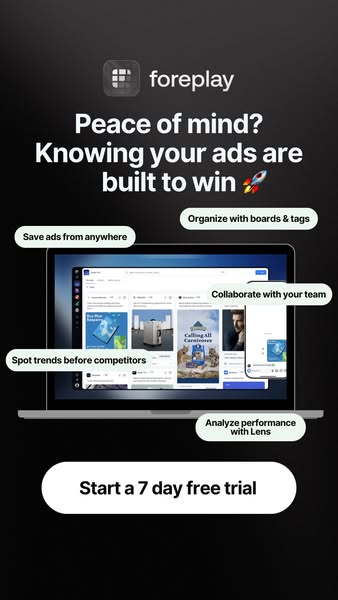
**1. "What have we kept running longest, and why is it working?"**

<div style="margin:8px 0">
<img src="https://marx-ad-assets.s3.ap-south-1.amazonaws.com/108047081396228/1894624038142459/image_0.jpeg" alt="Foreplay Meta ad: &quot;Peace of mind? Knowing your ads are built to win&quot; -- introducing Foreplay" style="width:100%;max-width:380px;height:auto;border-radius:10px;display:block;margin:0 auto">
</div>

Eighty-eight days on an ad that sells reassurance rather than a feature. Your longest runner is the closest thing you have to a statement of what your market actually responds to -- and almost nobody reads their account this way, because Ads Manager sorts by spend, not by survival.

**2. "What's the offer doing in each of our ads?"**

<div style="margin:8px 0">
<img src="https://marx-ad-assets.s3.amazonaws.com/ads/345914995276546/1032195002780861/47c0af30.jpg" alt="IM8 Meta ad: &quot;$54 in welcome gifts -- on us&quot;, a welcome kit offer" style="width:100%;max-width:380px;height:auto;border-radius:10px;display:block;margin:0 auto">
</div>

A welcome-gift offer is a hesitation-reducer pretending to be a hook, or the reverse -- and the answer changes what you do when it fades. If the offer is the hook, a new image won't save it.

**3. "What did competitors ship, and how hard are they backing it?"**

<div style="display:flex;align-items:flex-start;gap:10px;flex-wrap:wrap;margin:8px 0">
<img src="https://marx-ad-assets.s3.ap-south-1.amazonaws.com/424552764254311/943686274935864/image_0.jpg" alt="Blue Apron Meta ad: &quot;Take 50% off your first 3 orders&quot; with code DISCOVER50" style="flex:0 0 46%;max-width:310px;height:auto;border-radius:10px">
<img src="https://marx-ad-assets.s3.amazonaws.com/ads/165974826762135/1538714054460842/b18823c3.jpg" alt="CAVA Meta ad: &quot;Spice up your career&quot; -- apply now at CAVA" style="flex:0 0 46%;max-width:310px;height:auto;border-radius:10px">
</div>

Two different signals from the same question. Half off three orders is a rival telling you their retention maths works. A chain putting paid budget behind recruitment for 32 days is a rival staffing up -- which matters months before it shows in the auction.

**4. "What's in the category that we've never tried?"**

The gap question is the one a spreadsheet can't answer, because it needs data from outside your account. Ask it monthly rather than weekly; the answer changes slowly and it's usually a format, not a headline.

## Put it where the team already is

A report that lands in a doc gets read once. Two cadences work:

| Cadence | Where | What |
|---|---|---|
| Monday morning | Slack channel, per client | Last week's read, three decisions |
| Ad hoc, in the thread | Same channel | The follow-up questions above |
| Monthly | Doc or deck | Structure, measurement, the gap question |

The thread matters more than the report. Someone replies "why is that one fading?", the assistant answers from live data in the same place, and the brief for next week starts as a message rather than a meeting.

## Where it stops

Worth saying plainly, because the category oversells:

- **Read-only.** No pausing, no budget moves, no edits. If a tool offers those inside a chat window, ask who approves them.
- **No competitor spend.** Nobody has it. Longevity and copy counts are the honest public signals; treat any tool quoting a rival's budget with suspicion.
- **Charts get compacted.** Totals, shares, trends and outliers reach the model rather than every raw row. Better answers, but ask for the underlying number when a decision rests on it.
- **It won't decide for you.** It will name the diagnosis and propose the move. Someone still has to choose, and that's correct.

## Add the Marxx MCP server to Claude or ChatGPT

Connect your ad accounts, add `https://api.marxx.ai/mcp` as a custom connector, approve it, pick your workspace, and ask for this week's report in plain language. Read-only by design, so it's safe to hand to the whole team.

[Book a demo](/book-a-demo) and we'll write your first report live on the call, or see how the [MCP server](/mcp) works.

## FAQs

### Can AI write my Facebook ads report automatically?

Yes, if it can reach your account data. An MCP-connected assistant reads spend, creative performance and campaign structure directly, so it writes from live numbers rather than a pasted export -- and you can ask follow-ups in the same thread.

### What is an MCP server for ads?

Model Context Protocol is a standard way for assistants to connect to external data. An ads MCP server exposes your ad accounts and competitor data to Claude or ChatGPT as tools the assistant can call while answering.

### Is it safe to connect ad accounts to an AI assistant?

Ask whether it's read-only. The Marxx server is: twenty tools, all reads, no ability to pause campaigns or move budget. Anything that can spend money from a chat window needs an approval step in front of it.

### Does this work with ChatGPT as well as Claude?

Yes -- and with Cursor, VS Code, or any client supporting remote MCP servers. The connector URL is the same.

### What should a weekly ad report contain?

One line on what changed, a creative-level read with a named diagnosis for anything declining, what competitors shipped, and three decisions with the numbers behind them. If it has no decisions, it's a dashboard someone read aloud.

### Can it see my competitors' results?

It can see what they run, how long each ad has been live and how many copies of it exist. It cannot see their spend or their conversions, and neither can anyone else.

---
- [More Product articles](https://marxx.ai/posts/category/product)
- [All articles](https://marxx.ai/posts)