Marxx MCP
Your Meta and Google ad accounts, inside Claude.
Connect once. Ask about spend, creative and competitors in plain English, and get the answer in the chat.
Server URL
https://api.marxx.ai/mcp
The URL is the whole setup. Your assistant hands you off to Marxx, you approve the connection there, and the tools appear in the chat.
- OAuth, no keys to paste
- Changes need your yes


Setup
Connected in about two minutes.
One server covers both ad platforms and every workspace you belong to. You do this once, not once per account.
Connect Meta and Google Ads to Marxx
The server works on the accounts Marxx already indexes, so the workspace comes first. Meta and Google Ads connect to Marxx over OAuth. Connecting an account does not let an assistant change it: changes are a separate group of tools, off until they are switched on for that client.
Paste the URL as a custom connector
In Claude, add a custom connector under Settings. In ChatGPT, add it as a connector. The URL is the only thing you enter: there is no config file to edit and no key to paste anywhere.
Approve the connection on Marxx
The assistant hands you off to Marxx over OAuth. You sign in with your own Marxx account and approve the connection there, so no credential is ever typed into the assistant or stored in its settings.
Pick the workspace
Agencies running client-isolated workspaces pick one client before anything else is asked. Your chosen client applies to every assistant you connect until you switch. The assistant does this itself with marxx_select_workspace, so a question about one client cannot read another's spend.
Ask in plain English
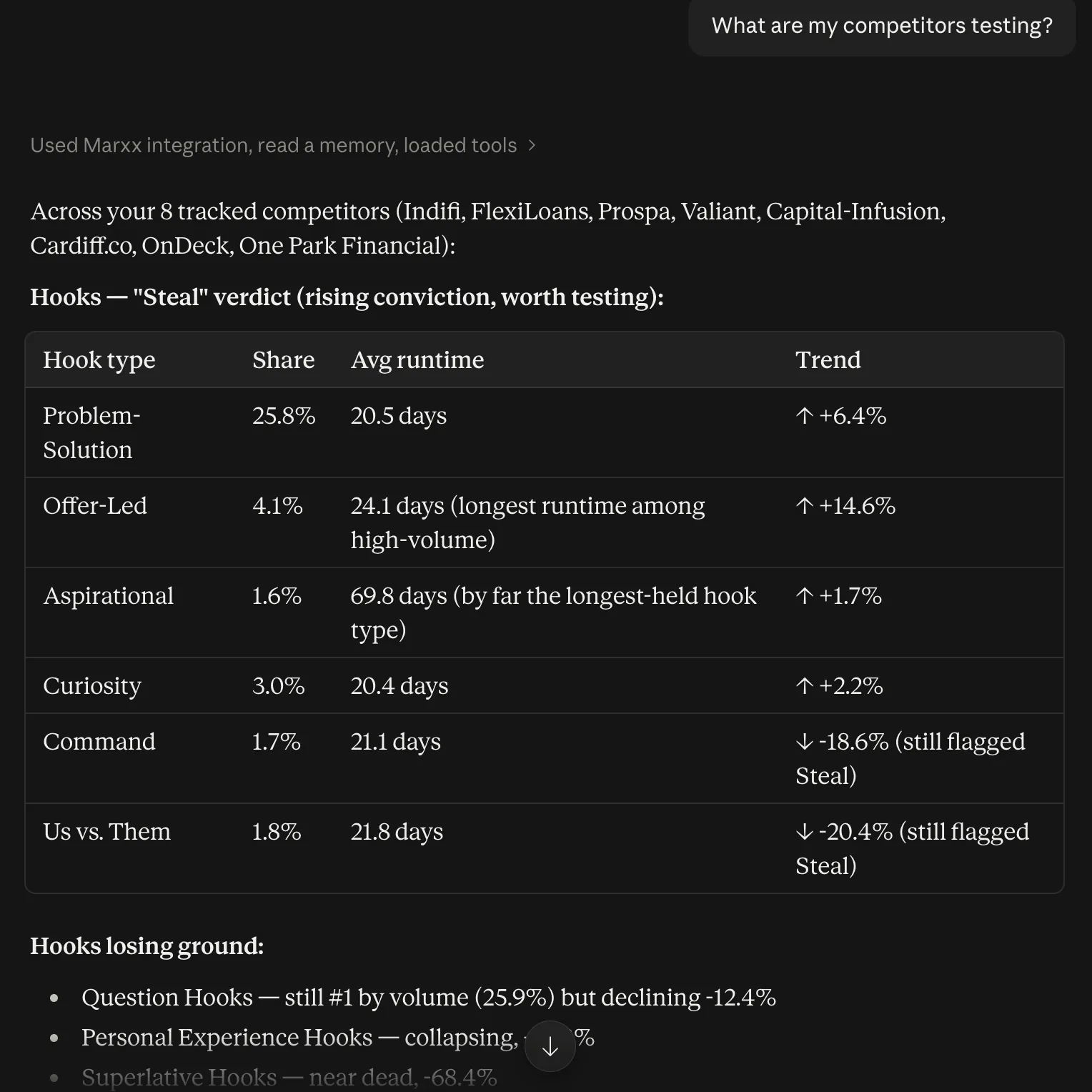
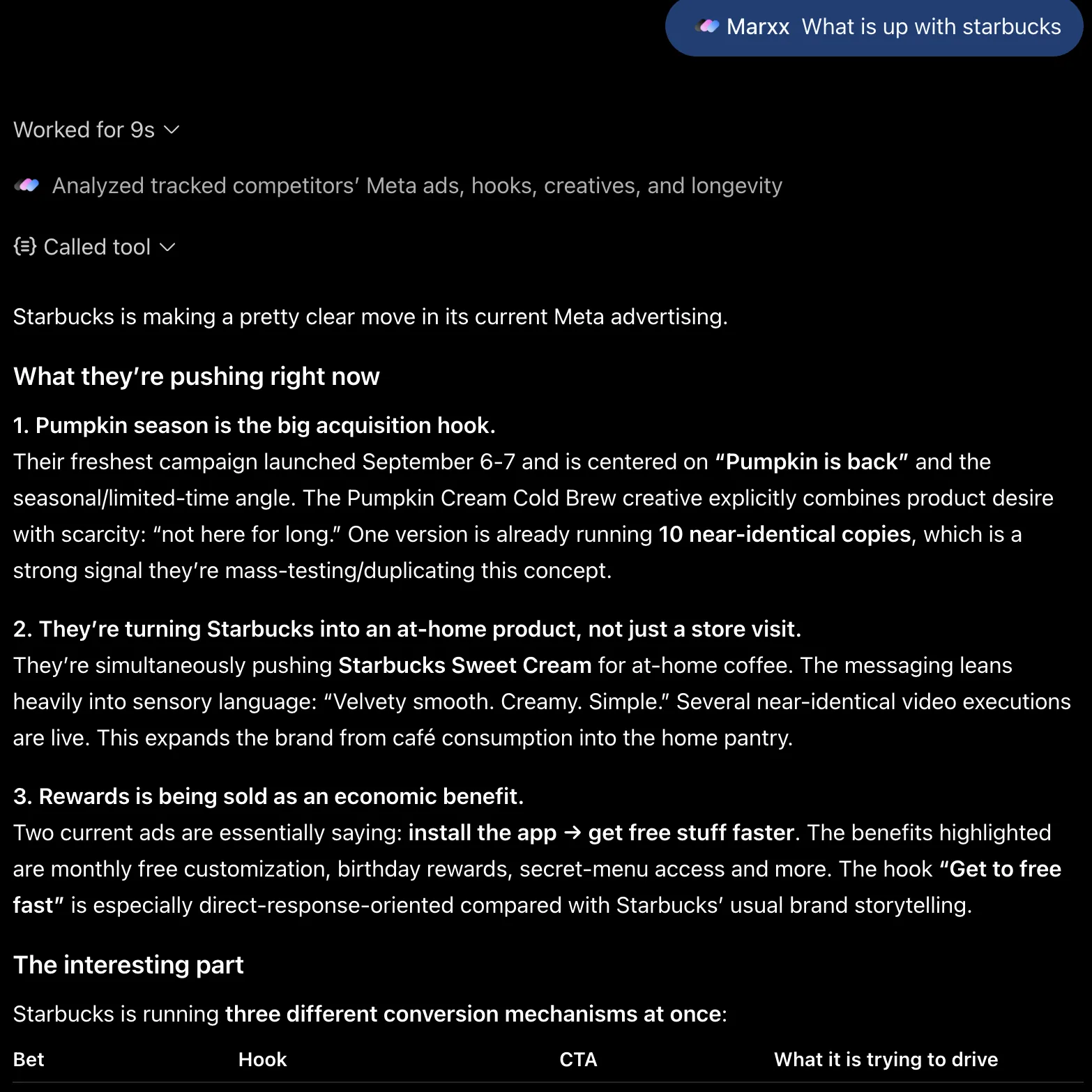
Ask what changed last week, which hook is fatiguing, or what a competitor shipped. The assistant picks the tools, and the answer arrives in the thread with the numbers behind it.
Step one needs a workspace. That is the call.
In thirty minutes we connect one Meta or Google account with you, turn the connector on, and you ask it your first question live. Nothing is changed in your ad account on the call, and you keep whatever the call produces.
Both platforms, read through the same tools.
Marxx already indexes the accounts for the app. The MCP server hands an assistant that same index, so nothing has to be re-ingested per question.
Meta Ads
Full creative history, not the last thirty days. Video, static and carousel parsed into hooks, formats, angles and offers, with spend, CPA and frequency attached to each one.
Google Ads
Campaign structure, budgets and spend alongside the creative, so a question about rising CPA can be answered across both platforms instead of one at a time.
Tools
100 tools the assistant picks from.
You never call these by name. They are listed because knowing what a connector can reach is the difference between trusting it and guessing. Some groups are off until they are switched on for a client, so a connected assistant may see fewer.
Clients and accounts (3)
Pick the client you are working on and list the ad accounts connected to it.
- marxx_select_workspace
- marxx_my_ad_accounts
- marxx_google_ad_accounts
Your Meta ads (9)
Performance, structure and live status of the client's own Meta ads.
- marxx_my_ads_overview
- marxx_my_ads
- marxx_meta_ads_live
- marxx_meta_account_status
- marxx_meta_ads_diagnostics
- marxx_meta_ads_setup
- marxx_meta_ads_media
- marxx_meta_targeting_search
- marxx_meta_audience_estimate
Account audits (6)
Fixed audits of the client's Meta account, plus a Meta and Google side by side.
- marxx_account_audit
- marxx_audit_spend_waste
- marxx_audit_creative_pipeline
- marxx_audit_scalability
- marxx_audit_budget_changes
- marxx_channel_brief
Competitors and market (10)
Ads from brands the client tracks, what they have in common, and what is trending in the sector.
- marxx_tracked_competitors
- marxx_brand_teardown
- marxx_competitor_creative_intelligence
- marxx_competitor_ad_fetcher
- marxx_ad_detail_by_id
- marxx_keyword_teardown
- marxx_creative_gap_recommendations
- marxx_performance_brief
- marxx_trending_tactics
- marxx_trend_tactic_detail
Boards and moodboards (5)
Saved ads, and a search that collects ads on a theme into a moodboard.
- marxx_saved_ads
- marxx_expand_query
- marxx_search_and_dedupe
- marxx_load_more_ads
- marxx_save_to_board
Brand and audience (5)
What the client's brand stands for, its products, assets and audience personas.
- marxx_brand_knowledge
- marxx_products
- marxx_brand_assets
- marxx_audience_personas
- marxx_persona_voice_of_customer
Google Ads reports (4)
Stored Google Ads history and analysis. Search campaigns only.
- marxx_google_ads
- marxx_google_ads_analysis
- marxx_google_ads_weekly_report
- marxx_google_ads_live
Google Ads changes (5)
Draft a change, review it, then apply it. The assistant is instructed to wait for your yes in the chat.
- marxx_google_ads_draft_campaign
- marxx_google_ads_draft_additions
- marxx_google_ads_draft_update
- marxx_google_ads_apply_change
- marxx_google_ads_changes
Meta ads changes (9)
Draft a change, review it, then apply it. The assistant is instructed to wait for your yes in the chat.
- marxx_meta_ads_creation_options
- marxx_meta_ads_draft_update
- marxx_meta_ads_draft_campaign
- marxx_meta_ads_draft_add_ads
- marxx_meta_ads_draft_ad_set
- marxx_meta_ads_draft_copy
- marxx_meta_ads_apply_change
- marxx_meta_ads_changes
- marxx_meta_media_upload
Creative generation (32)
Make images, video, voice and music, and run quality checks. Some tools spend credits. They are marked.
- marxx_generate_image
- marxx_generate_carousel
- marxx_generate_video
- marxx_animate_image
- marxx_generate_voiceover
- marxx_generate_music
- marxx_lip_sync
- marxx_generate_avatar
- marxx_edit_image
- marxx_upscale_video
- marxx_ugc_blueprint
- marxx_ugc_render
- marxx_run_node
- marxx_resize_image
- marxx_stitch_videos
- marxx_add_audio_to_video
- marxx_extract_frame
- marxx_ingest_reference
- marxx_upload_asset
- marxx_check_upload
- marxx_list_assets
- marxx_generation_status
- marxx_list_generations
- marxx_list_models
- marxx_estimate_cost
- marxx_credit_balance
- marxx_list_voices
- marxx_qa_review
- marxx_pick_best
- marxx_get_node_manual
- marxx_creative_capabilities
- marxx_open_in_editor
Video editor (12)
Edit a video in the Marxx editor. Paid steps and steps that cannot be undone wait for Approve in the editor tab. Archiving a project is the exception.
- marxx_editor_open
- marxx_editor_state
- marxx_editor_read
- marxx_editor_edit
- marxx_editor_quote
- marxx_editor_spend
- marxx_editor_destructive
- marxx_editor_cancel
- marxx_editor_help
- marxx_editor_projects
- marxx_editor_project_change
- marxx_editor_project_remove
Reads by default. Changes on request.
Changing an ad account, spending credits and editing video are off until switched on for a client. Ad changes are drafted first, and the assistant is instructed to wait for your yes in the chat.
Scoped to one workspace
Agency sessions answer inside a single client at a time, so one client's question cannot reach another client's account.
What people actually ask it.
Why not just point Claude at the ad platforms?
Platform MCPs answer about ad IDs
Meta's and Google's own endpoints hand back rows keyed to campaign and ad IDs. Marxx rolls the same spend up by hook, angle, format and offer, so the answer is a creative decision you can repeat rather than an identifier you cannot.
One thread, both platforms
Meta and Google sit behind the same tools, so a question that spans them is one question. No swapping servers mid-conversation and no reconciling two answers by hand afterwards.
It can see outside your account
No ad API can tell you what a competitor is running. The tracked-competitor tools carry live creative from brands you do not own, scored on the same axis as your own, which is the half of the picture an account-only connection never has.
Marxx MCP, answered.
How do I connect Claude to my Google Ads and Meta Ads accounts?
Connect the ad accounts inside Marxx first, then add https://api.marxx.ai/mcp to Claude as a custom connector. That URL is the only thing you enter. Claude hands you off to Marxx over OAuth, you approve the connection there, and the assistant works on the client you choose, on both Meta and Google Ads.
Does it work in ChatGPT and other assistants?
Yes. Marxx runs a standard hosted MCP server with OAuth, so any client that supports remote MCP servers can use it. Claude and ChatGPT are the two we test against every release; Cursor, VS Code and the rest take the same URL and the same approval flow.
Can it change or pause my campaigns?
It can draft changes, but only when that client has Meta ads changes or Google Ads changes switched on. Both are off by default. The assistant shows you the draft. It is instructed to send nothing to the ad account until you say yes to that exact draft. Drafts expire after 30 minutes. Risky changes, such as turning ads on, removing things or moving a budget by a lot, need a second, specific confirmation: the server refuses to apply them unless the assistant passes a high-risk confirmation, and the assistant is instructed to get your specific confirmation first. A new Meta campaign is staged in your Ads Manager drafts when it is drafted. Nothing runs until it is published.
What does it send to the model?
Only the results of the tool the assistant called. Chart data is compacted before it is sent, into the totals, shares, trends and outliers each chart exists to show, because a model reading tens of thousands of raw points can only guess at the shape.
How do agencies keep clients separate?
Each client is its own workspace in Marxx, and the assistant works on one client at a time. Your chosen client applies to every assistant you connect until you switch. An assistant working on one client's question cannot read another client's spend, creative or competitors.
How do I disconnect it?
Remove the connector in your assistant to end its access. To cut ad-account access for every Marxx surface, including the MCP server, disconnect Meta or Google inside Marxx.
Which plan includes the MCP server?
The Marxx MCP server and the Slack bot ship on the same plans. See pricing for what each tier includes.
One size fits none. Let’s build your exact setup.
Hop on a call with our founder to see real-world use cases, cut out the noise, and isolate the exact tools that drive results for your business — complete with a personalized pricing plan.